Building an Agentic AI POC on Azure AI Foundry: The Cloud-Optimizer-Agent
A same-day proof of concept — an Azure AI Foundry agent with real function/tool calling, wired end-to-end into a live Django backend and published on lanacloud.com — including every error message we actually hit along the way.
Why This Project
Most "we built an AI agent" write-ups show you the finished chatbot and skip the part that actually matters to an engineering audience: what happens the first time the model tries to call your tool and the platform says no. This post doesn't skip that part.
The goal of this POC was narrow and deliberate: prove that LanaCloud can stand up an Agentic AI architecture with genuine function/tool calling — not a scripted demo, but a model that decides on its own when it has enough information to call check_architecture_cost, executes that call against a real backend, and turns a numeric result into a professional recommendation. The scenario: a client describes their cloud setup (provider, monthly spend, whether they run a Lakehouse), and the agent estimates their optimization savings and proposes a Delta Lake / Medallion migration.

Browser → Django view → Azure AI Foundry Responses API (agent_reference) → function_call → local Python execution → function_call_output → final answer.
The full stack: a chat widget on the Agentic AI service page → a Django view → the azure-ai-projects SDK's OpenAI-compatible Responses client → the Cloud-Optimizer-Agent in Azure AI Foundry → a local Python function that computes the actual savings number.
How to Use This Guide
This is written as a build log, not a marketing summary. Each part covers what we configured, what broke, and what the actual fix was — including the exact error text, because that's the part tutorials usually leave out.
Prerequisites
| Requirement | Notes |
|---|---|
| Azure subscription with AI Foundry access | A resource + project in ai.azure.com |
| A chat-completion model deployment | We used gpt-5-mini (Global Standard) |
| Microsoft Entra App Registration | Server-to-server auth — Foundry's Responses API uses Entra ID, not a plain API key |
azure-ai-projects + azure-identity |
Python SDKs — pip install azure-ai-projects azure-identity |
| An existing backend to wire it into | We used Django, but the pattern is framework-agnostic |
Build sequence
| Step | What we built | Hard dependency |
|---|---|---|
| 1 | Foundry project + model deployment | Azure subscription with quota |
| 2 | Agent + system prompt | Project + model deployed |
| 3 | Function tool JSON Schema | Agent created |
| 4 | Tool registered on the agent version (not per-request) | SDK access to client.agents |
| 5 | Django backend (foundry_agent.py) |
App Registration + RBAC role |
| 6 | Chat widget on the website | Backend endpoint working locally |
| 7 | Production deploy (Render) | All of the above, plus secrets set in the dashboard |
Part 1 — Creating the Project and Agent in Azure AI Foundry
In ai.azure.com, we created a project named Lanacloud-Architecture-Audit under the lanacloud-Architecture--resource resource, then deployed gpt-5-mini as a Global Standard deployment. From the Agents tab, we created a new agent named Cloud-Optimizer-Agent.
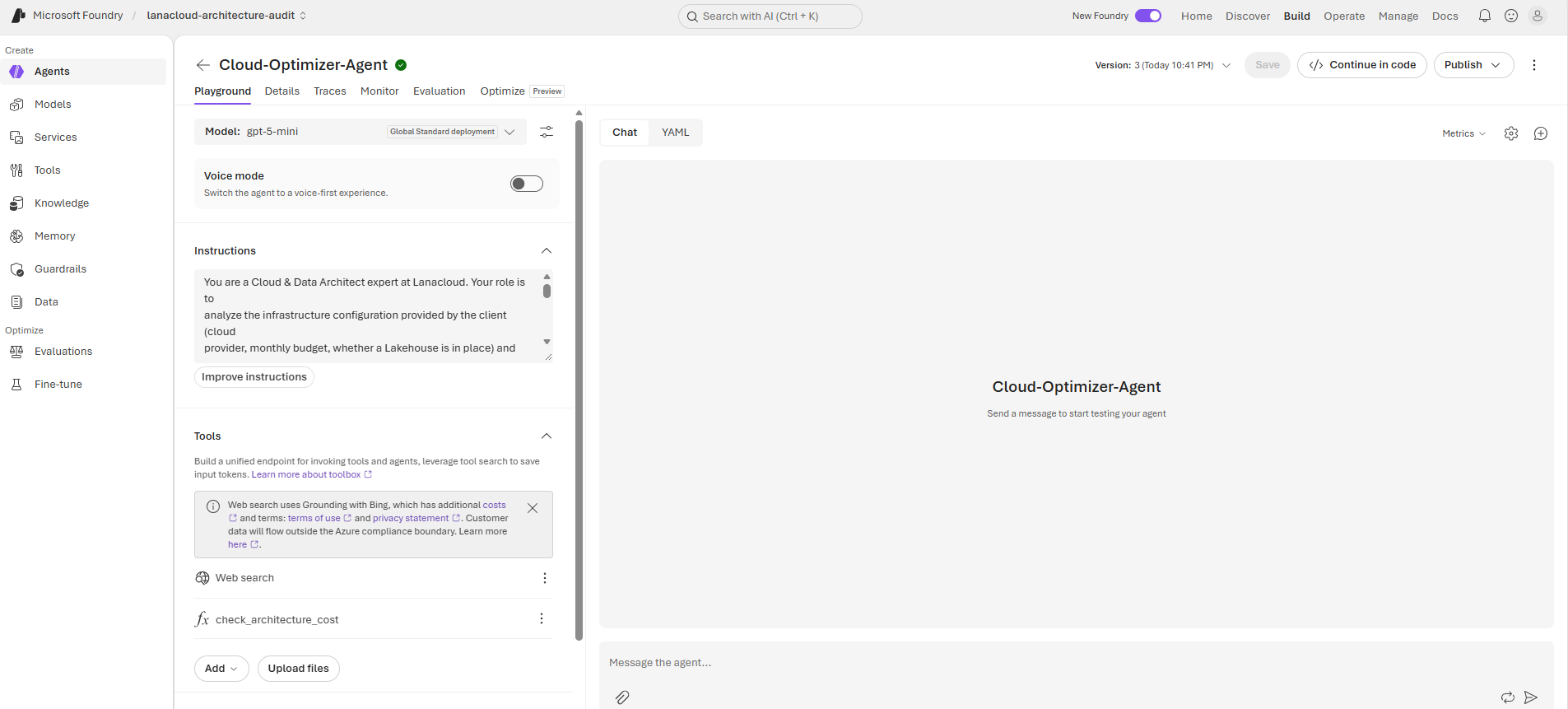
The agent's Playground — model, instructions, and tools all live on the agent's own version, not on the calling application.
The Foundry portal also surfaces the exact endpoint and calling convention you need for code — under Details → Endpoints, we found the project endpoint and a dedicated "Responses protocol" URL for this agent, plus a ready-to-paste Python snippet using the azure-ai-projects SDK's OpenAI-compatible client:
from azure.identity import DefaultAzureCredential
from azure.ai.projects import AIProjectClient

endpoint = "https://lanacloud-architecture--resource.services.ai.azure.com/api/projects/lanacloud-Architecture-Audit"

project_client = AIProjectClient(endpoint=endpoint, credential=DefaultAzureCredential())

my_agent, my_version = "Cloud-Optimizer-Agent", "2"
openai_client = project_client.get_openai_client()

response = openai_client.responses.create(
    input=[{"role": "user", "content": "Tell me what you can help with."}],
    extra_body={"agent_reference": {"name": my_agent, "version": my_version, "type": "agent_reference"}},
)
print(response.output_text)
This confirmed the calling convention: it's the OpenAI Responses API, addressed at a specific agent via extra_body={"agent_reference": {...}} — not the older Assistants-style thread/run polling loop.
Part 2 — Writing the System Prompt
The agent's instructions do more than describe a persona — they enforce the exact rule the function-calling architecture depends on: never estimate the numbers yourself, always call the tool.
You are a Cloud & Data Architect expert at Lanacloud. Your role is to analyze the
infrastructure configuration provided by the client (cloud provider, monthly budget,
whether a Lakehouse is in place) and use your `check_architecture_cost` tool to
evaluate opportunities for cost, performance, and security optimization.

Rules:
- As soon as you have the 3 required pieces of information (cloud provider, monthly
  budget, whether a Lakehouse is in place), call the `check_architecture_cost` tool
  before answering. Never calculate the savings yourself.
- If any information is missing, ask a short, precise question to get it before
  calling the tool.
- Once you receive the tool's result, explain it in 3-4 professional sentences: the
  estimated savings amount, an architecture recommendation, and a remark about
  performance or security relevant to the cloud provider mentioned.
- Respond in the language used by the client (French or English).
- Stay factual: don't promise figures beyond what the tool returns.
That last rule under "Rules" — never calculate the savings yourself — is what turns this from a chatbot with a canned script into a genuine tool-calling agent: the model has to recognize when it has enough structured information and defer the actual math to code it doesn't control.
Part 3 — Defining the Function Tool
The tool is a plain JSON Schema function definition — no remote endpoint, because the function runs locally in our own backend:
{
  "type": "function",
  "name": "check_architecture_cost",
  "description": "Calculates the savings and optimization potential of a Lakehouse or Data Warehouse",
  "parameters": {
    "type": "object",
    "properties": {
      "cloud_provider": { "type": "string" },
      "monthly_spend": { "type": "number" },
      "has_lakehouse": { "type": "boolean" }
    },
    "required": ["cloud_provider", "monthly_spend", "has_lakehouse"]
  }
}
And the local execution — the actual "brain" behind the tool call:
def _check_architecture_cost(cloud_provider: str, monthly_spend: float, has_lakehouse: bool) -> dict:
    savings = monthly_spend * 0.10 if has_lakehouse else monthly_spend * 0.25
    return {
        "estimated_savings_usd": round(savings, 2),
        "recommendation": f"Migrate to a Delta Lake / Medallion architecture on {cloud_provider}",
    }
Part 4 — The Discovery: Tools Belong to the Agent, Not the Request
This is the part every quickstart skips. Our first backend attempt passed the tool schema on every call, the same way you would with a plain OpenAI Chat Completions integration:
response = client.responses.create(
    input=next_input,
    tools=[TOOL_SCHEMA],
    extra_body={"agent_reference": agent_reference},
)
That failed immediately:
BadRequestError: Error code: 400 - {'error': {'code': 'invalid_payload',
'message': "Not allowed when agent is specified.", 'param': 'tools',
'type': 'invalid_request_error', ...}}
When you address a request at a named agent (agent_reference), Foundry treats the agent's own definition as the single source of truth for its tools — you can't bolt extra ones on per-request. The fix is to register the tool on the agent's version itself, using the management surface of the azure-ai-projects SDK (client.agents), not the OpenAI-compatible responses client:
from azure.ai.projects import AIProjectClient
from azure.ai.projects.models import FunctionTool
from azure.identity import ClientSecretCredential

client = AIProjectClient(endpoint=ENDPOINT, credential=ClientSecretCredential(...), allow_preview=True)

current = client.agents.get_version("Cloud-Optimizer-Agent", "2")
definition = current.definition

new_tool = FunctionTool(
    name="check_architecture_cost",
    description="Calculates the savings and optimization potential of a Lakehouse or Data Warehouse",
    parameters={
        "type": "object",
        "properties": {
            "cloud_provider": {"type": "string"},
            "monthly_spend": {"type": "number"},
            "has_lakehouse": {"type": "boolean"},
        },
        "required": ["cloud_provider", "monthly_spend", "has_lakehouse"],
    },
    strict=False,
)

definition.tools = list(definition.tools or []) + [new_tool]
new_version = client.agents.create_version("Cloud-Optimizer-Agent", definition=definition)
print("Created version:", new_version.version)  # -> 3
Running this created version 3 of the agent — the existing web_search tool plus our new check_architecture_cost function, both now part of the agent's own definition. From that point on, the backend only needs to reference {"name": "Cloud-Optimizer-Agent", "version": "3"} — no tools parameter at all.
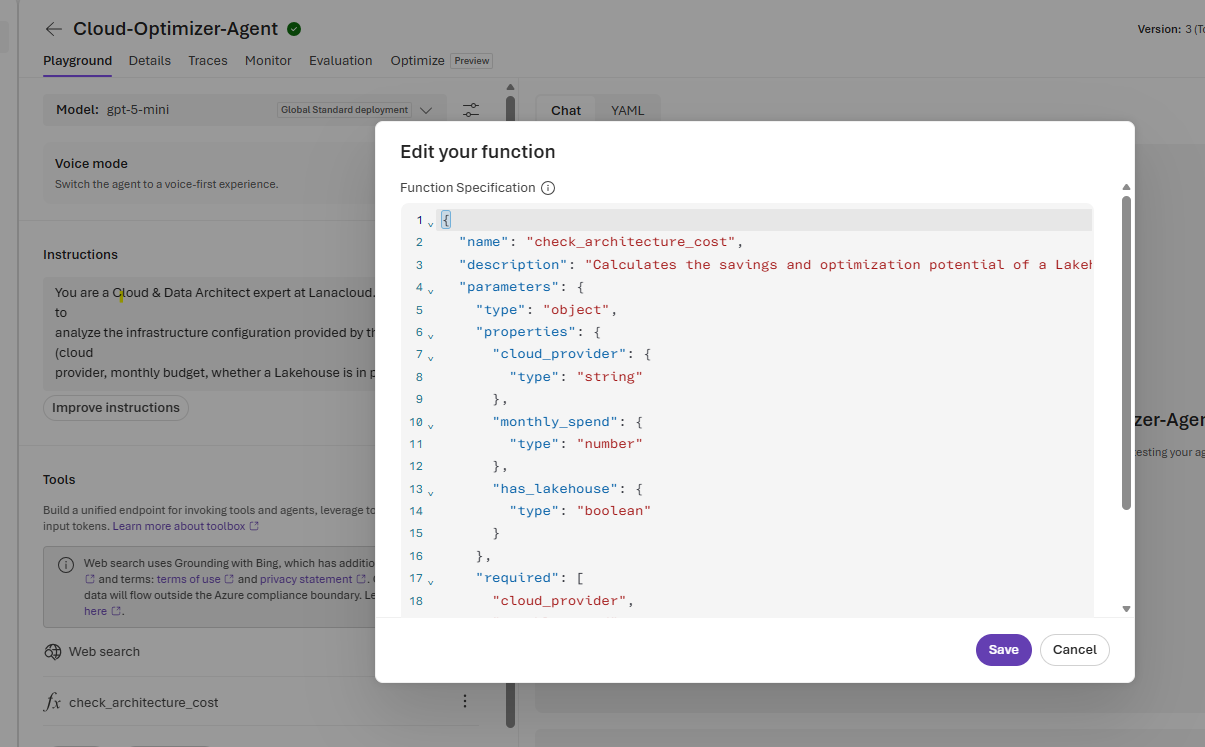
After running create_version(), the tool shows up in the portal's own Tools list — proof it now lives on the agent, not in our request payload.
Part 5 — Building the Django Backend
With the tool living on the agent, the backend's job simplifies to: send the user's message, watch for function_call items in the response, execute them locally, and hand the result back as a function_call_output.
def ask(session, user_message: str) -> str:
    client = _openai_client()
    agent_reference = {
        "name": settings.AZURE_AI_FOUNDRY_AGENT_NAME,
        "version": settings.AZURE_AI_FOUNDRY_AGENT_VERSION,
        "type": "agent_reference",
    }
    previous_response_id = session.get("foundry_response_id")
    next_input: list = [{"role": "user", "content": user_message}]

    for _ in range(MAX_TOOL_ROUNDTRIPS):
        create_kwargs = {"input": next_input, "extra_body": {"agent_reference": agent_reference}}
        if previous_response_id:
            create_kwargs["previous_response_id"] = previous_response_id
        response = client.responses.create(**create_kwargs)
        previous_response_id = response.id

        tool_calls = [item for item in response.output if item.type == "function_call"]
        if not tool_calls:
            session["foundry_response_id"] = previous_response_id
            session.modified = True
            return response.output_text

        next_input = []
        for call in tool_calls:
            args = json.loads(call.arguments)
            result = _check_architecture_cost(**args)
            next_input.append({
                "type": "function_call_output",
                "call_id": call.call_id,
                "output": json.dumps(result),
            })

    raise RuntimeError("Max tool-call iterations reached without a final answer")
Two details worth calling out:
- Session-persisted
previous_response_idkeeps the conversation stateful across separate HTTP requests, so the agent remembers earlier turns (e.g. "no Lakehouse yet" from a previous message) without us re-sending the full history ourselves. - The tool-call loop caps out at
MAX_TOOL_ROUNDTRIPSso a misbehaving model can't spin the backend forever — each turn either produces a final answer or another tool call, never both indefinitely.
Part 6 — Wiring It Into the Website
The Django side is a thin, familiar layer: a POST view that calls foundry_agent.ask() and returns JSON, a URL route, and a chat-style widget on the existing Agentic AI service page — reusing the same demo-section styling as our text-to-SQL demo, just with a running chat transcript instead of a single query/response block.
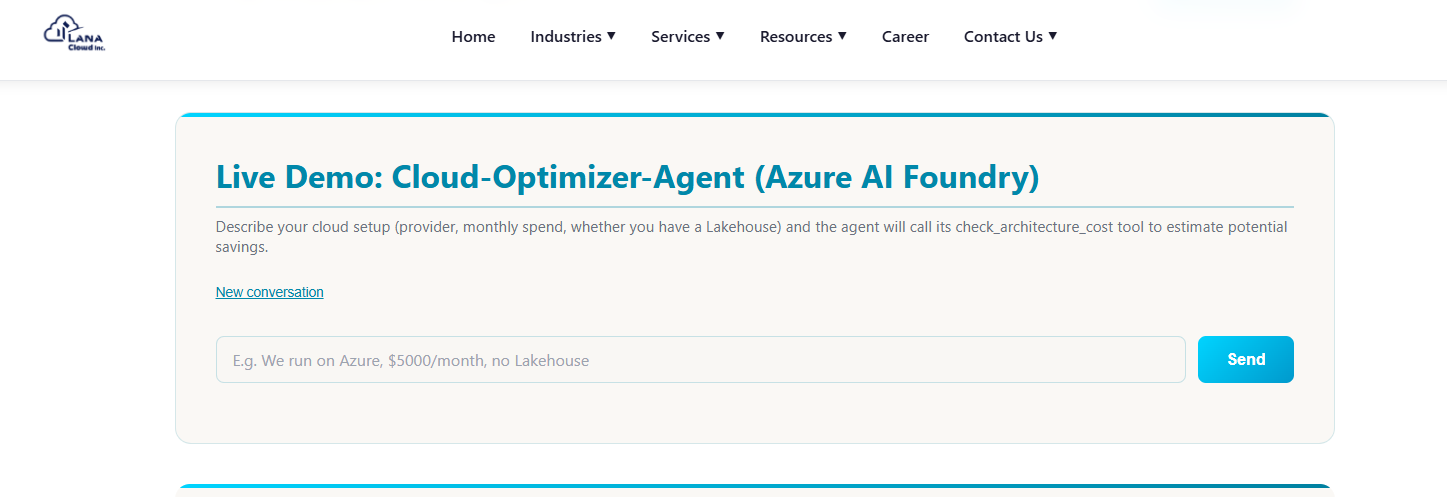
The live demo on lanacloud.com — the agent calls check_architecture_cost, then explains the result in plain language.
A real exchange from testing:
User: We use Azure, $4000/month, no Lakehouse yet.
Cloud-Optimizer-Agent: Estimated savings: $1,000/month.
Recommendation: Migrate to a Delta Lake / Medallion-style lakehouse architecture on Azure (e.g., using Azure Data Lake Storage Gen2 + Delta Lake on Azure Databricks or Azure Synapse Spark) to consolidate ETL, reduce redundant storage and compute, and simplify data governance.
Remark (performance/security): A lakehouse using Delta Lake will improve query performance through data skipping and compaction while enabling stronger transactional guarantees; on Azure, combine this with role-based access via Azure AD, managed identities, and storage encryption (SSE) to maintain data security and meet compliance requirements.
$4,000 × 25% (no Lakehouse) = $1,000 — the number came straight out of our Python function, and the model wrapped it in exactly the professional explanation the system prompt asked for.
Part 7 — The Real Debugging Session
None of the above worked on the first try. In the interest of an honest build log, here's every error we actually hit, in order, with the real fix:
Bug 1 — Secret ID vs. Secret Value
ClientAuthenticationError: Authentication failed: AADSTS7000215: Invalid client
secret provided. Ensure the secret being sent in the request is the client secret
value, not the client secret ID, for a secret added to app '...'.
Azure App Registrations show two columns under Certificates & secrets: a GUID-shaped Secret ID and a long alphanumeric Value. The fix was simply using the Value — but the Value is only ever displayed once, at creation time, so if you've already navigated away, you have to generate a new secret rather than trying to recover the old one.
Bug 2 — Missing RBAC role (403)
PermissionDeniedError: Error code: 403
Authentication succeeding isn't the same as authorization. The App Registration needed the Foundry User role assigned on the Foundry project, granted via Access control (IAM) on the underlying resource in portal.azure.com — not through the Foundry portal's own "Add user" dialog, which searches human directory accounts, not service principals.
Bug 3 — previous_response_id sent as an explicit null
BadRequestError: Error code: 400 - {'error': {'code': 'invalid_payload',
'message': 'Expected string, got Null', 'param': 'previous_response_id', ...}}
On the very first turn of a conversation there is no prior response, but the API expects the parameter to be omitted entirely — not passed as None. The fix was to only add previous_response_id to the request payload when a value actually exists:
create_kwargs = {"input": next_input, "extra_body": {"agent_reference": agent_reference}}
if previous_response_id:
    create_kwargs["previous_response_id"] = previous_response_id
response = client.responses.create(**create_kwargs)
Bug 4 — tools not allowed alongside agent_reference
Covered in full in Part 4 — the fix was registering the tool on the agent's version via client.agents.create_version() instead of passing it per-request.
Four bugs, four different layers of the stack (credential format, authorization, request-payload semantics, and API architecture) — which is a fairly representative sample of what actually happens the first time you wire a new agent platform into a real backend.
What This Build Demonstrates
| Capability | What Was Demonstrated |
|---|---|
| Agent configuration | Project, model deployment, and agent creation in Azure AI Foundry |
| Function/tool calling | A genuine model-initiated tool call, resolved by real local Python code |
| Agent versioning | Adding a tool via the SDK's agents.create_version(), producing a new immutable version |
| Backend integration | A stateful, session-persisted conversation loop against the Responses API |
| Production auth | Entra ID service principal + RBAC role assignment for server-to-server calls |
| Live deployment | Wired into a Django view, chat widget, and shipped to Render |
The point of a POC like this isn't just a working demo — it's the map of exactly where a platform's abstractions leak, so the next integration goes faster. Every error above is now a five-minute fix instead of an afternoon of guessing.